
Action Contexts
Understanding where and how to place actions throughout your Filament application is crucial for creating intuitive user workflows that guide users through complex business processes. From table-level operations to granular form interactions, Filament provides contextually aware action placement that ensures users can perform the right actions at the right time with the appropriate data scope and permissions.
# Table Row Actions
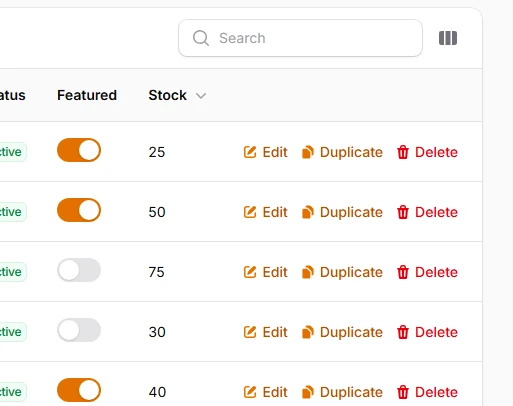
Actions that operate on individual table records, providing row-specific operations like editing, viewing, deleting, or custom business logic. These actions automatically receive the current record context and can open modals, redirect to pages, or execute immediate operations with built-in confirmation flows.
use Filament\Tables\Actions\Action;
use Filament\Tables\Actions\DeleteAction;
use Filament\Tables\Actions\EditAction;
use Filament\Tables\Table;

public function table(Table $table): Table
{
    return $table
        ->recordActions([
            EditAction::make(),
            Action::make('duplicate')
                ->icon('heroicon-m-document-duplicate')
                ->action(function ($record) {
                    $record->replicate()->save();
                }),
            DeleteAction::make(),
        ]);
}
# Table Header Actions
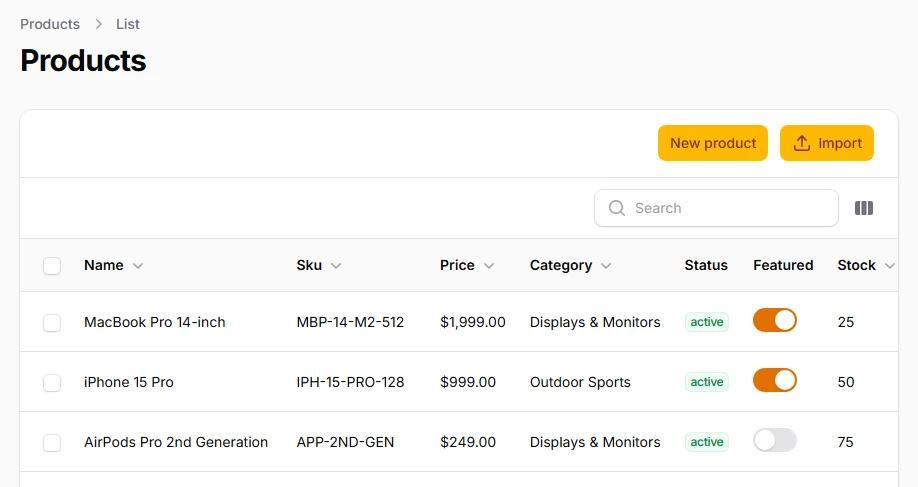
Global table actions positioned in the header area, typically used for operations that create new records or affect the entire dataset. These actions don't have access to specific record data but can interact with table-wide configurations and are perfect for import, export, and creation workflows.
use Filament\Tables\Actions\CreateAction;
use Filament\Tables\Actions\Action;
use Filament\Tables\Table;

public function table(Table $table): Table
{
    return $table
        ->headerActions([
            CreateAction::make(),
            Action::make('import')
                ->icon('heroicon-m-arrow-up-tray')
                ->schema([
                    FileUpload::make('file')
                        ->acceptedFileTypes(['text/csv'])
                        ->required(),
                ])
                ->action(function (array $data) {
                    // Import logic
                }),
        ]);
}
# Table Bulk Actions
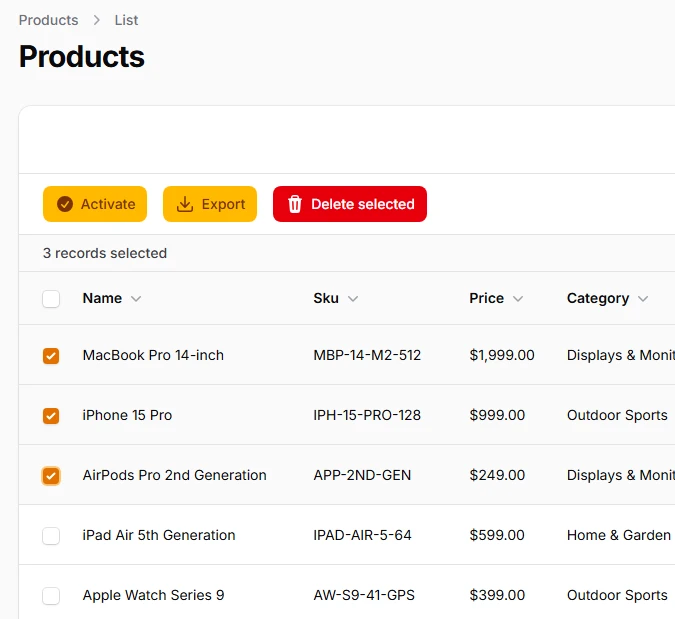
Actions that operate on multiple selected records simultaneously, enabling efficient batch operations like status updates, bulk delete, or mass data transformations. These actions receive a collection of selected records and can include custom selection logic and confirmation dialogs for safety.
use Filament\Tables\Actions\BulkAction;
use Filament\Tables\Actions\DeleteBulkAction;
use Filament\Tables\Table;
use Illuminate\Database\Eloquent\Collection;

public function table(Table $table): Table
{
    return $table
        ->toolbarActions([
            BulkAction::make('activate')
                ->icon('heroicon-m-check-circle')
                ->requiresConfirmation()
                ->action(function (Collection $records) {
                    $records->each->update(['status' => 'active']);
                }),
            BulkAction::make('export')
                ->icon('heroicon-m-arrow-down-tray')
                ->action(function (Collection $records) {
                    return response()->streamDownload(function () use ($records) {
                        echo $records->toCsv();
                    }, 'export.csv');
                }),
            DeleteBulkAction::make(),
        ]);
}
# Table Toolbar Actions
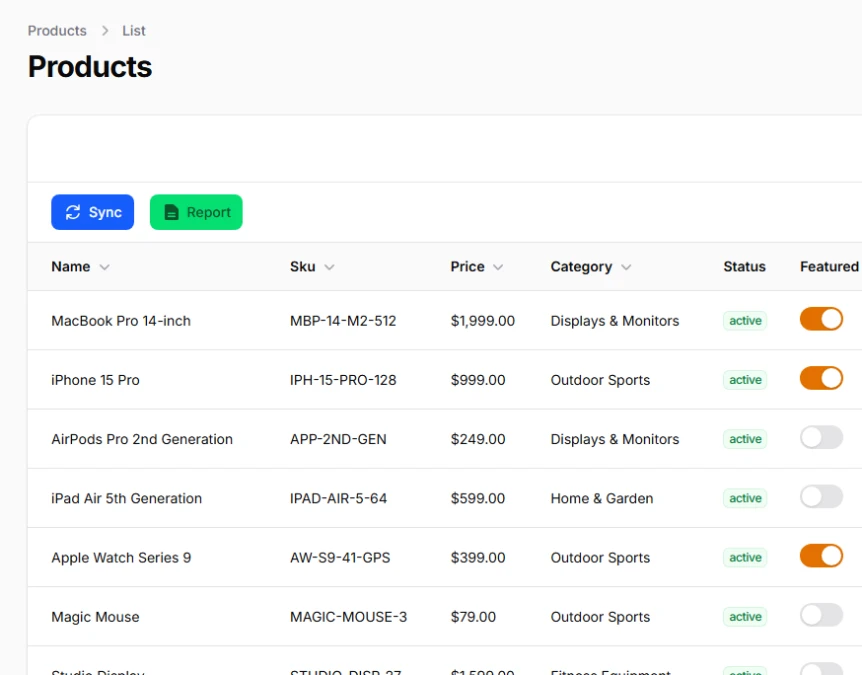
Prominent actions displayed in the table toolbar area for maximum visibility, often used for frequently accessed operations or context-switching actions that need immediate user attention. These actions can include both regular actions and bulk actions with enhanced visibility.
use Filament\Tables\Actions\Action;
use Filament\Tables\Table;

public function table(Table $table): Table
{
    return $table
        ->toolbarActions([
            Action::make('sync')
                ->icon('heroicon-m-arrow-path')
                ->color('info')
                ->action(function () {
                    // Sync external data
                    $this->syncExternalData();
                }),
            Action::make('report')
                ->icon('heroicon-m-document-text')
                ->color('success')
                ->url(route('reports.generate')),
        ]);
}
# Table Column Actions
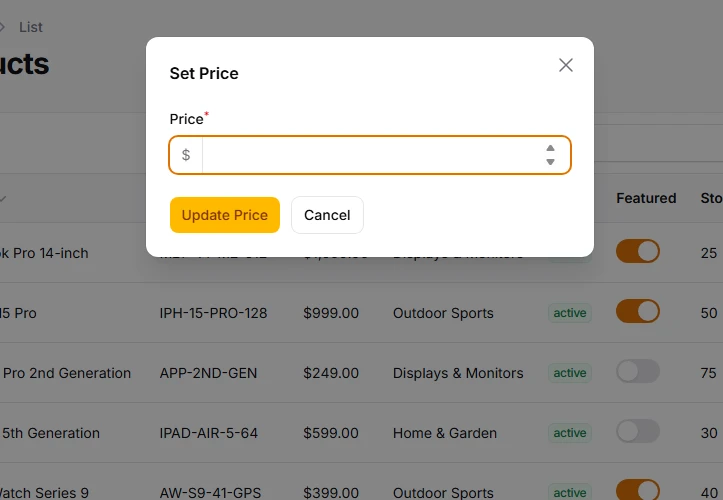
Actions embedded within specific table columns, transforming individual cells into interactive triggers that can execute context-aware operations. Perfect for inline editing, status toggles, or quick actions that don't require leaving the table view.
use Filament\Tables\Actions\Action;
use Filament\Forms\Components\TextInput;
use Filament\Tables\Columns\TextColumn;
use Filament\Tables\Table;

public function table(Table $table): Table
{
    return $table
        ->columns([
            // ...
            TextColumn::make('price')
                ->money('USD')
                ->sortable()
                ->action(
                    Action::make('setPrice')
                        ->schema([
                            TextInput::make('price')
                                ->label('Price')
                                ->numeric()
                                ->prefix('$')
                                ->step(0.01)
                                ->required()
                        ])
                        ->modalWidth('md')
                        ->action(function (array $data, $record): void {
                            $record->update([
                                'price' => $data['price']
                            ]);
                        })
                        ->modalHeading('Set Price')
                        ->modalSubmitActionLabel('Update Price')
                ),
        ]);
}
# Form Actions
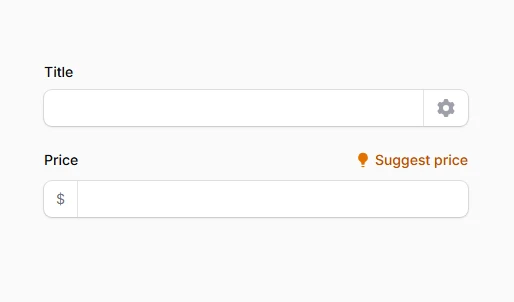
Contextual actions integrated within form components, including affix actions (prefix/suffix), hint actions, and standalone action groups. These provide real-time form manipulation capabilities like field auto-generation, validation helpers, and dynamic content updates without full form submission.
use Filament\Forms\Components\Actions;
use Filament\Forms\Components\Actions\Action;
use Filament\Forms\Components\TextInput;
use Filament\Forms\Set;

TextInput::make('title')
    ->live(onBlur: true)
    ->suffixAction(
        Action::make('generateSlug')
            ->icon('heroicon-m-cog-6-tooth')
            ->action(function ($state, Set $set) {
                $set('slug', Str::slug($state));
            })
    ),

TextInput::make('price')
    ->prefix('$')
    ->hintAction(
        Action::make('suggestPrice')
            ->icon('heroicon-m-light-bulb')
            ->action(function (Set $set, $get) {
                $cost = $get('cost');
                $set('price', $cost * 1.3); // 30% markup
            })
    ),
# Page Header Actions
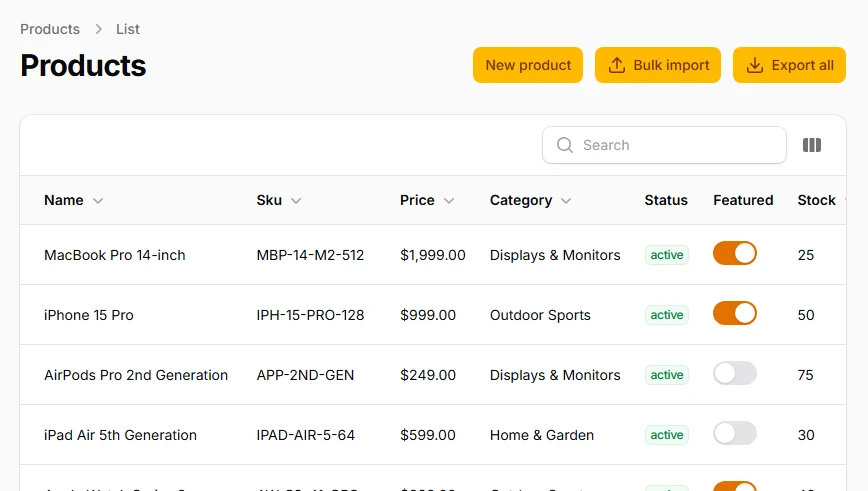
Page-level actions displayed in the header across different page types (List, Create, Edit, View, Custom), providing consistent action placement for primary page operations. These actions automatically inherit page context and can access current records or page state.
<?php

use App\Filament\Resources\Products\ProductResource;
use Filament\Actions\Action;
use Filament\Actions\CreateAction;
use Filament\Forms\Components\FileUpload;
use Filament\Resources\Pages\ListRecords;

class ListProducts extends ListRecords
{
    protected static string $resource = ProductResource::class;

    protected function getHeaderActions(): array
    {
        return [
            CreateAction::make(),
            Action::make('bulkImport')
                ->icon('heroicon-m-arrow-up-tray')
                ->schema([
                    FileUpload::make('csv_file')
                        ->acceptedFileTypes(['text/csv'])
                        ->required(),
                ])
                ->action(function (array $data) {
                    $this->processBulkImport($data['csv_file']);
                }),
            Action::make('exportAll')
                ->icon('heroicon-m-arrow-down-tray')
                ->action(fn () => $this->exportAllRecords()),
        ];
    }
}
# Infolist Actions
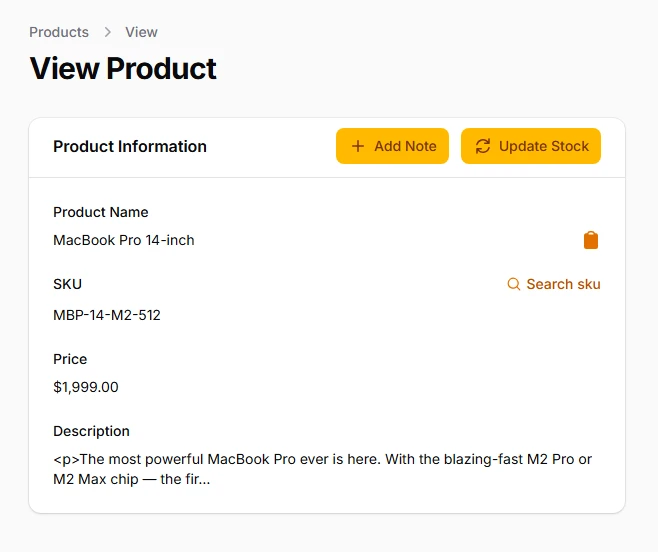
Actions embedded within read-only infolist components, enabling contextual interactions without switching to edit mode. Perfect for quick updates, related record creation, or triggering workflows based on displayed information while maintaining the infolist's read-only nature.
Section::make('Product Information')
    ->schema([
        TextEntry::make('name')
            ->label('Product Name')
            ->suffixAction(
                Action::make('copyName')
                    ->icon('heroicon-m-clipboard')
                    ->tooltip('Copy product name')
                    ->action(function ($record) {
                        Notification::make()
                            ->title('Product name copied to clipboard')
                            ->success()
                            ->send();
                    })
            ),
        TextEntry::make('sku')
            ->label('SKU')
            ->copyable()
            ->hintAction(
                Action::make('searchSku')
                    ->icon('heroicon-m-magnifying-glass')
                    ->tooltip('Search this SKU')
                    ->url(fn ($record) => "https://www.google.com/search?q={$record->sku}")
                    ->openUrlInNewTab()
            ),
        TextEntry::make('price')
            ->label('Price')
            ->money('USD'),
        TextEntry::make('description')
            ->label('Description')
            ->limit(100),
    ])
    ->headerActions([
        Action::make('addNote')
            ->icon('heroicon-m-plus')
            ->label('Add Note')
            ->schema([
                Textarea::make('content')
                    ->label('Note Content')
                    ->required()
                    ->rows(3),
            ])
            ->action(function ($record, array $data) {
                // Assuming you have a notes relationship
                $record->notes()->create([
                    'content' => $data['content'],
                    'user_id' => auth()->id(),
                ]);

                Notification::make()
                    ->title('Note added successfully')
                    ->success()
                    ->send();
            }),
        Action::make('updateStock')
            ->icon('heroicon-m-arrow-path')
            ->label('Update Stock')
            ->schema([
                TextInput::make('stock_quantity')
                    ->label('New Stock Quantity')
                    ->numeric()
                    ->required(),
            ])
            ->action(function ($record, array $data) {
                $record->update(['stock_quantity' => $data['stock_quantity']]);

                Notification::make()
                    ->title('Stock updated successfully')
                    ->success()
                    ->send();
            }),
    ]),
# Notification Actions
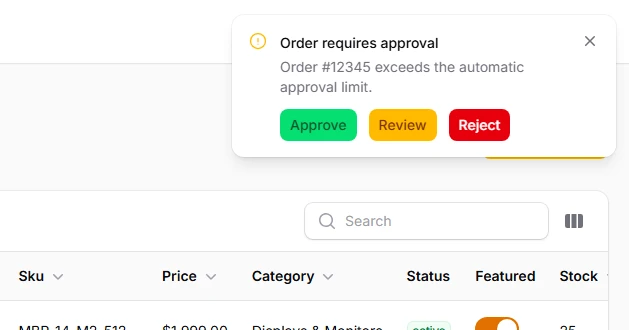
Actionable buttons within notification messages that enable users to respond to system events, alerts, or workflow updates. These actions can open URLs, dispatch Livewire events, or trigger follow-up workflows directly from notification toasts without navigating away from the current context.
use Filament\Notifications\Actions\Action;
use Filament\Notifications\Notification;

// In your action or event handler
Notification::make()
    ->title('Order requires approval')
    ->warning()
    ->body('Order #12345 exceeds the automatic approval limit.')
    ->persistent()
    ->actions([
        Action::make('approve')
            ->button()
            ->color('success')
            ->dispatch('approveOrder', [12345]),
        Action::make('review')
            ->button()
            ->url(route('orders.review', 12345), shouldOpenInNewTab: true),
        Action::make('reject')
            ->button()
            ->color('danger')
            ->requiresConfirmation()
            ->dispatch('rejectOrder', [12345]),
    ])
    ->send();
# Global Search Actions
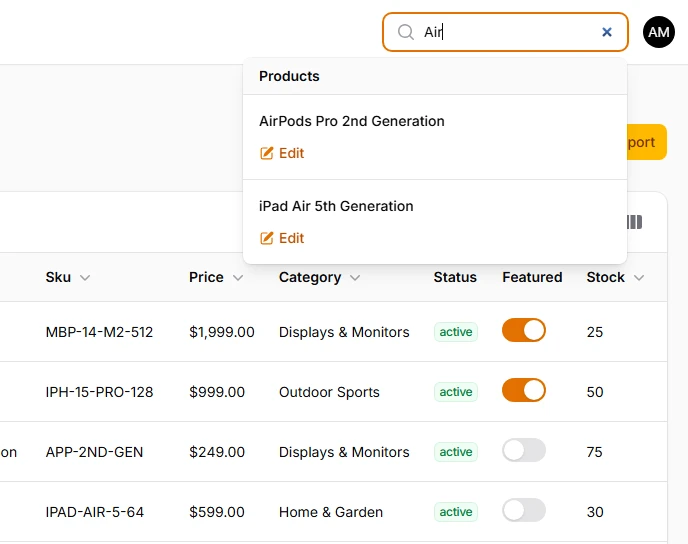
Actions attached to global search results that provide quick operations on found records without navigating to the full resource page. These actions appear below search results and enable rapid workflows like quick edit, duplicate, or view operations directly from search.
use Filament\GlobalSearch\Actions\Action;
use Filament\Resources\Resource;
use Illuminate\Database\Eloquent\Model;

class ProductResource extends Resource
{
    public static function getGlobalSearchResultActions(Model $record): array
    {
        return [
            Action::make('edit')
                ->icon('heroicon-m-pencil-square')
                ->url(static::getUrl('edit', ['record' => $record])),
        ];
    }
}
# Modal Actions
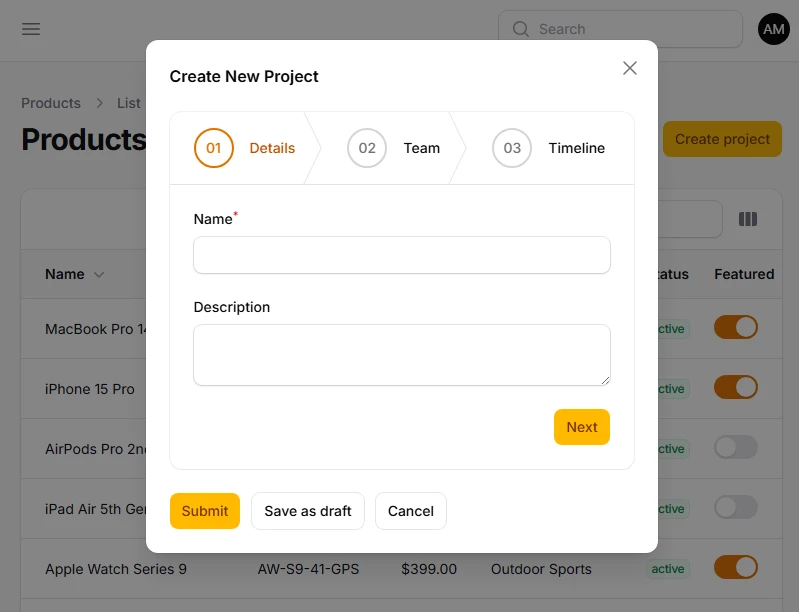
Actions within modal dialogs that control modal behavior, form submission, and multi-step workflows. These actions can include custom form actions, wizard navigation, and conditional submission logic that adapts based on form state and validation results.
use Filament\Actions\Action;
use Filament\Forms\Components\Wizard;

Action::make('createProject')
    ->schema([
        Wizard::make([
            Wizard\Step::make('Details')
                ->schema([
                    TextInput::make('name')->required(),
                    Textarea::make('description'),
                ]),
            Wizard\Step::make('Team')
                ->schema([
                    Select::make('team_lead')
                        ->relationship('users', 'name')
                        ->required(),
                    CheckboxList::make('members')
                        ->relationship('users', 'name'),
                ]),
            Wizard\Step::make('Timeline')
                ->schema([
                    DatePicker::make('start_date')->required(),
                    DatePicker::make('end_date')->required(),
                ]),
        ])
    ])
    ->modalWidth('lg')
    ->modalHeading('Create New Project')
    ->action(function (array $data) {
        Project::create($data);
    })
    ->extraModalFooterActions([
        Action::make('saveAsDraft')
            ->color('gray')
            ->action(function (array $data) {
                Project::create(array_merge($data, ['status' => 'draft']));
            }),
    ]),