
Toolbar / Bulk Actions
When users need to perform the same operation on multiple records, bulk actions provide an intuitive way to execute code against selected table rows. From simple deletions to complex data transformations, Filament's bulk action system handles everything from authorization to performance optimization, ensuring smooth operations even with thousands of selected records.
# Simple delete operations
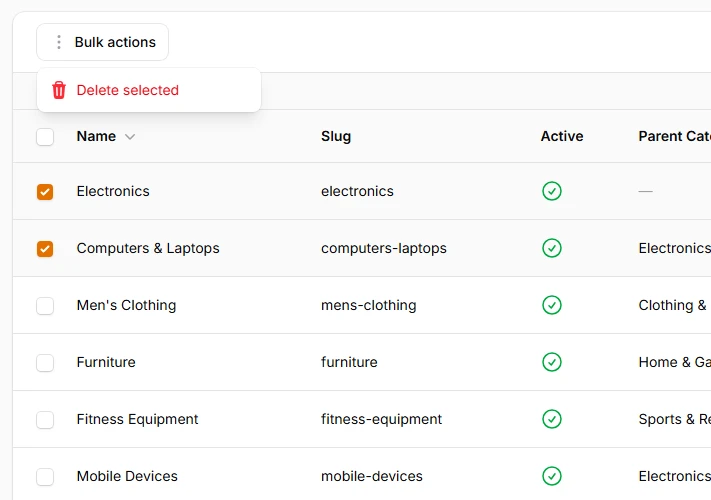
Start with the most common bulk operation using Filament's built-in delete action. When bulk actions are defined, each table row automatically displays a checkbox for selection. The delete action includes built-in confirmation modals and handles the deletion safely.
use Filament\Actions\BulkActionGroup;
use Filament\Actions\DeleteBulkAction;
use Filament\Tables\Table;

public function table(Table $table): Table
{
    return $table
        ->toolbarActions([
            BulkActionGroup::make([
                DeleteBulkAction::make(),
            ]),
        ]);
}
# Grouped bulk actions dropdown
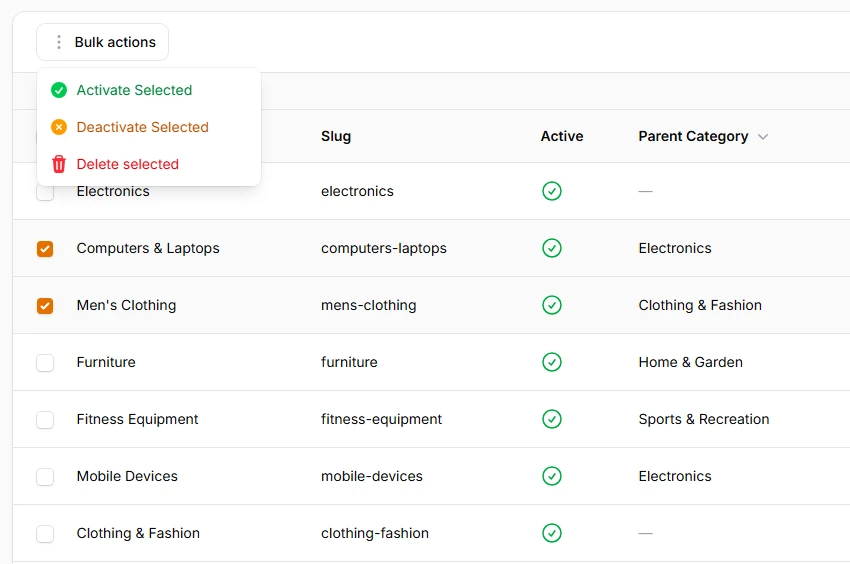
Organize multiple bulk actions into a clean dropdown interface to prevent toolbar clutter. The BulkActionGroup component creates a dropdown menu containing related actions, while actions outside the group render as individual buttons alongside the dropdown trigger.
->toolbarActions([
    BulkActionGroup::make([
        // Status management actions
        BulkAction::make('activate')
            ->label('Activate Selected')
            ->icon('heroicon-m-check-circle')
            ->color('success')
            ->action(function (Collection $records): void {
                $records->each(fn (Category $record) =>
                    $record->update(['is_active' => true])
                );
            })
            ->requiresConfirmation(),

        BulkAction::make('deactivate')
            ->label('Deactivate Selected')
            ->icon('heroicon-m-x-circle')
            ->color('warning')
            ->action(function (Collection $records): void {
                $records->each(fn (Category $record) =>
                    $record->update(['is_active' => false])
                );
            })
            ->requiresConfirmation(),

        DeleteBulkAction::make(),
    ]),
])
# Multiple grouped action collections
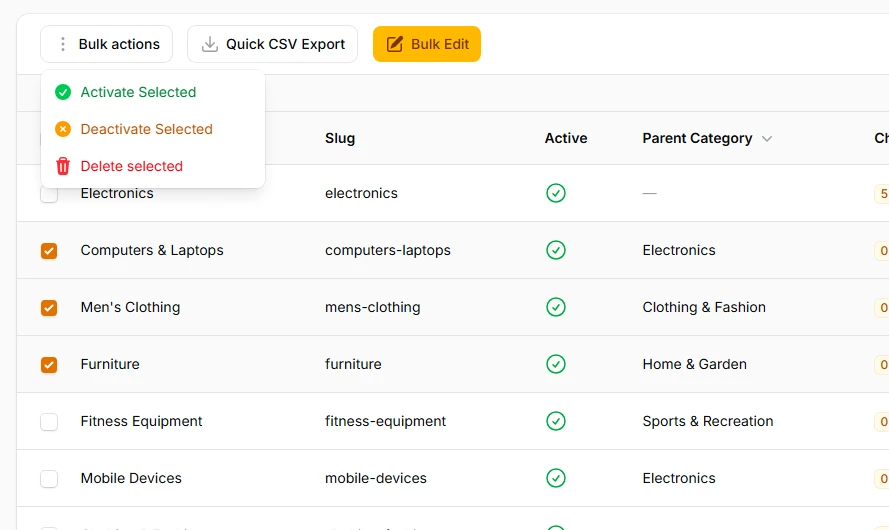
Organize complex bulk operations into logical groupings when dealing with numerous action types. Multiple BulkActionGroups help maintain clean interfaces while providing comprehensive functionality. Each group represents a different operational domain, making it easier for users to find and execute the right actions.
->toolbarActions([
    BulkActionGroup::make([
        // Status management actions
        BulkAction::make('activate')
            ->label('Activate Selected')
            ->icon('heroicon-m-check-circle')
            ->color('success')
            ->action(function (Collection $records): void {
                $records->each(fn (Category $record) =>
                    $record->update(['is_active' => true])
                );
            })
            ->requiresConfirmation(),

        BulkAction::make('deactivate')
            ->label('Deactivate Selected')
            ->icon('heroicon-m-x-circle')
            ->color('warning')
            ->action(function (Collection $records): void {
                $records->each(fn (Category $record) =>
                    $record->update(['is_active' => false])
                );
            })
            ->requiresConfirmation(),

        DeleteBulkAction::make(),
    ]),

    // Standalone actions outside groups for immediate access
    BulkAction::make('quickExport')
        ->label('Quick CSV Export')
        ->button()
        ->icon('heroicon-m-arrow-down-tray')
        ->color('gray')
        ->action(function () {
            // ...
        }),

    BulkAction::make('bulkEdit')
        ->label('Bulk Edit')
        ->button()
        ->icon('heroicon-m-pencil-square')
        ->color('primary')
        ->action(function () {
            // ...
        }),
])