
Repeater and Builder Components
Transform static forms into dynamic, flexible input experiences with Filament's most powerful form components. While traditional forms lock you into rigid structures, repeaters and builders let users create exactly the content they need - from simple item lists to complex, multi-block page layouts. These components handle everything from basic data collection to sophisticated content management systems, making them indispensable for modern applications that demand flexibility without sacrificing user experience.
# Basic repeater with schema definition
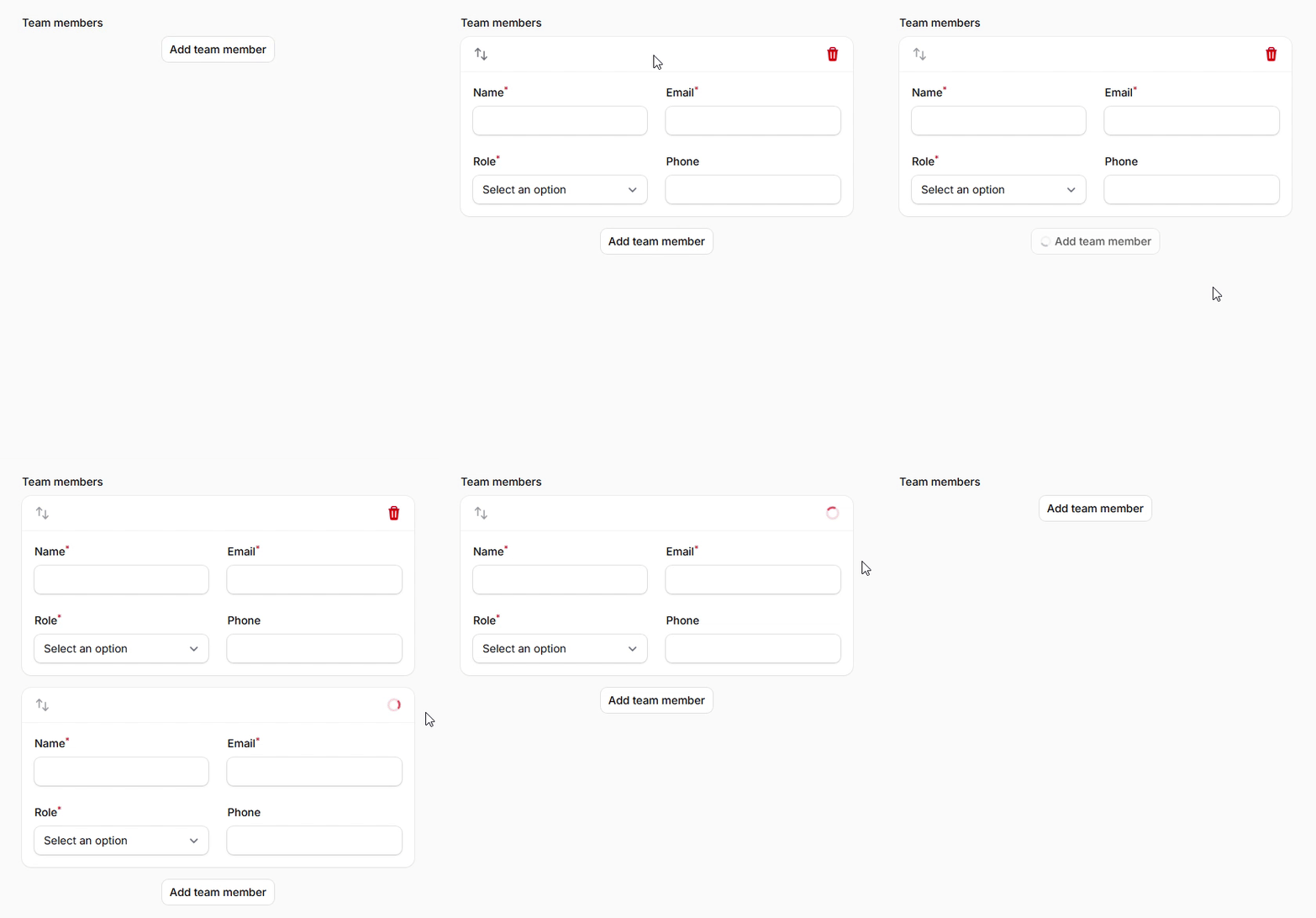
Create repeatable form sections with a consistent schema that users can add, remove, and reorder. Perfect for collecting lists of related data like team members, contact information, or product variants. The schema method defines what fields appear in each repeated item.
use Filament\Forms\Components\Repeater;
use Filament\Forms\Components\TextInput;
use Filament\Forms\Components\Select;

Repeater::make('team_members')
    ->schema([
        TextInput::make('name')
            ->required()
            ->maxLength(255),
        TextInput::make('email')
            ->email()
            ->required(),
        Select::make('role')
            ->options([
                'developer' => 'Developer',
                'designer' => 'Designer',
                'manager' => 'Manager',
                'admin' => 'Administrator',
            ])
            ->required(),
        TextInput::make('phone')
            ->tel()
            ->maxLength(20),
    ])
    ->columns(2)
    ->defaultItems(1)
    ->addActionLabel('Add team member')
Item management controls and user interactions
Fine-tune user interactions with comprehensive control over adding, deleting, reordering, and cloning items. These methods let you create exactly the interaction pattern your application needs, from locked data structures to completely flexible lists.
use Filament\Forms\Components\Repeater;

Repeater::make('product_variants')
    ->schema([
        // ... schema fields
    ])
    ->addable(true)          // Allow adding new items
    ->deletable(true)        // Allow deleting items
    ->reorderable(true)      // Allow drag-and-drop reordering
    ->cloneable(true)        // Allow duplicating existing items
    ->reorderableWithButtons() // Use up/down buttons instead of drag-and-drop
    ->collapsed()            // Start with items collapsed
    ->minItems(1)           // Require at least one item
    ->maxItems(10)          // Limit to maximum 10 items
    ->addActionLabel('Add product variant')
    ->addBetweenActionLabel('Insert variant')
    ->cloneActionLabel('Duplicate variant')
    ->deleteActionLabel('Remove variant')
# Multi-block content builder with flexible schemas
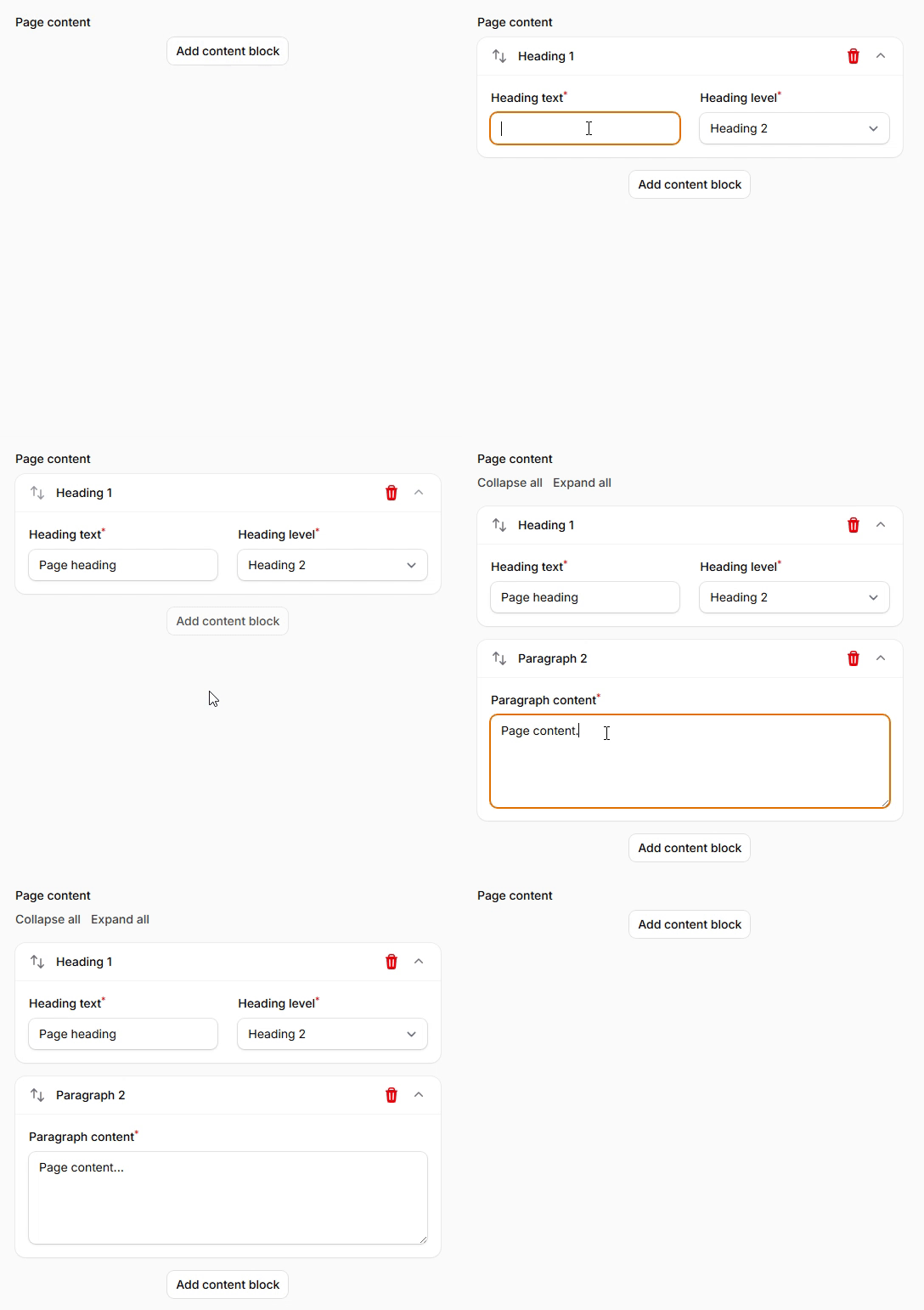
Create sophisticated content structures using the Builder component, which allows different block types with unique schemas. Perfect for content management systems, page builders, or any scenario requiring flexible, mixed-content input capabilities.
use Filament\Forms\Components\Builder;
use Filament\Forms\Components\TextInput;
use Filament\Forms\Components\Textarea;
use Filament\Forms\Components\FileUpload;
use Filament\Forms\Components\Select;

Builder::make('page_content')
    ->blocks([
        Builder\Block::make('heading')
            ->label('Heading')
            ->icon('heroicon-o-h1')
            ->schema([
                TextInput::make('content')
                    ->label('Heading text')
                    ->required(),
                Select::make('level')
                    ->label('Heading level')
                    ->options([
                        'h1' => 'Heading 1',
                        'h2' => 'Heading 2',
                        'h3' => 'Heading 3',
                        'h4' => 'Heading 4',
                        'h5' => 'Heading 5',
                        'h6' => 'Heading 6',
                    ])
                    ->default('h2')
                    ->required(),
            ])
            ->columns(2),

        Builder\Block::make('paragraph')
            ->label('Paragraph')
            ->icon('heroicon-o-document-text')
            ->schema([
                Textarea::make('content')
                    ->label('Paragraph content')
                    ->required()
                    ->rows(4),
            ]),

        Builder\Block::make('image')
            ->label('Image')
            ->icon('heroicon-o-photo')
            ->schema([
                FileUpload::make('image')
                    ->label('Upload image')
                    ->image()
                    ->required(),
                TextInput::make('alt_text')
                    ->label('Alt text')
                    ->required(),
                TextInput::make('caption')
                    ->label('Caption'),
            ]),
    ])
    ->collapsible()
    ->addActionLabel('Add content block')