Hero background

Toast Notifications

Filament's notification system provides an elegant way to deliver feedback to users through non-intrusive toast messages that appear temporarily in the interface. These notifications automatically handle styling, positioning, and animations while offering extensive customization options for different message types, durations, and interactive elements. Whether you need simple success confirmations or complex notifications with action buttons, Filament's toast system scales from basic implementations to sophisticated user experiences that enhance application usability.

# Basic status notifications

Basic status notifications

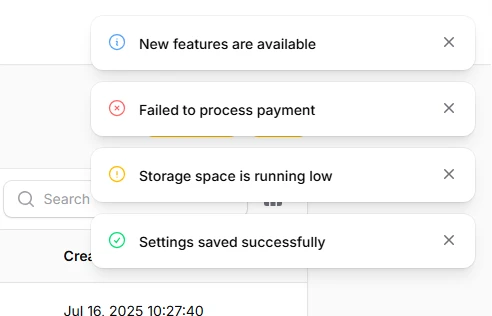
The foundation of Filament's notification system uses semantic status methods that automatically apply appropriate colors, icons, and styling. These status-based notifications provide immediate visual feedback using consistent design patterns that users recognize intuitively.

use Filament\Notifications\Notification;

// Success notification with green styling
Notification::make()
    ->title('Settings saved successfully')
    ->success()
    ->send();

// Warning notification with amber styling  
Notification::make()
    ->title('Storage space is running low')
    ->warning()
    ->send();

// Danger notification with red styling
Notification::make()
    ->title('Failed to process payment')
    ->danger()
    ->send();

// Info notification with blue styling
Notification::make()
    ->title('New features are available')
    ->info()
    ->send();

# Custom duration and persistence

Custom duration and persistence

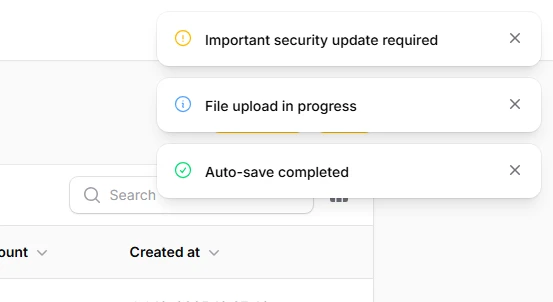
Control exactly how long notifications remain visible using duration methods or make them persist until manually dismissed. Duration can be specified in either milliseconds or seconds for flexible timing control that matches your application's needs.

use Filament\Notifications\Notification;

// Custom duration in seconds
Notification::make()
    ->title('Auto-save completed')
    ->success()
    ->seconds(10)
    ->send();

// Custom duration in milliseconds
Notification::make()
    ->title('File upload in progress')
    ->info()
    ->duration(15000)
    ->send();

// Persistent notification requiring manual dismissal
Notification::make()
    ->title('Important security update required')
    ->warning()
    ->persistent()
    ->send();

# Rich content with body text
Rich content with body text

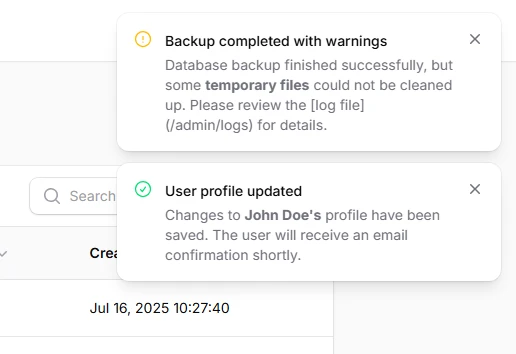
Add detailed information to notifications using body content that supports Markdown formatting for rich text presentation. Body text appears below the title and can include emphasis, links, and other formatting to provide comprehensive context.

use Filament\Notifications\Notification;

// Notification with formatted body content
Notification::make()
    ->title('User profile updated')
    ->success()
    ->body('Changes to <b>John Doe\'s</b> profile have been saved. The user will receive an email confirmation shortly.')
    ->send();

// Multi-line body with Markdown formatting
Notification::make()
    ->title('Backup completed with warnings')
    ->warning()
    ->body('Database backup finished successfully, but some <b>temporary files</b> could not be cleaned up. Please review the [log file](/admin/logs) for details.')
    ->send();
# Interactive notifications with actions

Interactive notifications with actions

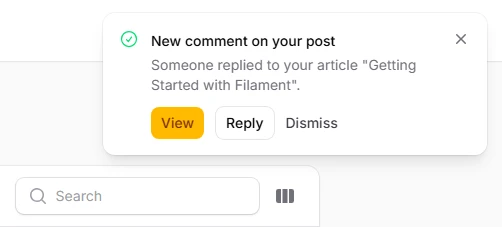
Transform notifications into actionable interfaces by adding buttons that trigger specific behaviors. Actions can navigate to URLs, dispatch Livewire events, or close the notification, creating seamless user workflows directly from toast messages.

use Filament\Notifications\Actions\Action;
use Filament\Notifications\Notification;

// Notification with multiple action buttons
Notification::make()
    ->title('New comment on your post')
    ->success()
    ->body('Someone replied to your article "Getting Started with Filament".')
    ->actions([
        Action::make('view')
            ->button()
            ->url(route('posts.comments', $post))
            ->markAsRead(),
        Action::make('reply')
            ->button()
            ->color('gray')
            ->dispatch('openReplyModal', [$comment->id]),
        Action::make('dismiss')
            ->link()
            ->color('gray')
            ->close(),
    ])
    ->send();

# Custom icons and colors

Custom icons and colors

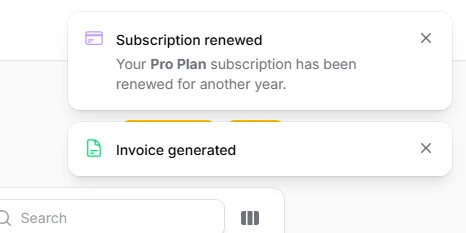
Override default styling with custom icons and colors to match your brand or provide specific visual cues. Icons support Heroicons and custom SVGs, while colors can use Filament's palette or custom values for complete visual control. Custom colors need to be defined in your Panel provider.

use Filament\Notifications\Notification;

// Custom icon and color combination
Notification::make()
    ->title('Invoice generated')
    ->icon('heroicon-o-document-text')
    ->iconColor('success')
    ->send();

// Custom styling for brand-specific notifications
Notification::make()
    ->title('Subscription renewed')
    ->icon('heroicon-o-credit-card')
    ->iconColor('indigo')
    ->body('Your <b>Pro Plan</b> subscription has been renewed for another year.')
    ->send();