
Modal Actions
Modal Actions in Filament provide powerful ways to collect user input, display information, and guide users through complex workflows without leaving the current page context. Whether you need simple confirmations, detailed forms, or multi-step wizards, Filament's modal system offers the flexibility to create intuitive user experiences that feel native and responsive across all devices.
# Information Modals

Display read-only content in clean, focused modal dialogs perfect for showing detailed information, help content, or record summaries. Information modals use disabled form fields to present data in a structured, easy-to-scan format that maintains Filament's consistent design language.
use Filament\Actions\ViewAction;
use Filament\Forms\Components\TextInput;
use Filament\Forms\Components\Textarea;
use Filament\Forms\Components\DatePicker;

ViewAction::make()
    ->record($this->record)
    ->modalHeading('User Details')
    ->modalDescription('Complete user profile information')
    ->modalIcon('heroicon-o-user')
    ->modalIconColor('info')
    ->schema([
        TextInput::make('name')
            ->label('Full Name'),
        TextInput::make('email')
            ->label('Email Address'),
        Textarea::make('bio')
            ->label('Biography')
            ->rows(3),
        DatePicker::make('created_at')
            ->label('Member Since'),
    ])
# Confirmation Modals

Create destructive action safeguards with customizable confirmation dialogs that prevent accidental operations. These modals feature prominent visual cues including danger-themed colors, warning icons, and clear action descriptions that help users understand the consequences of their actions.
use Filament\Actions\Action;

Action::make('delete')
    ->label('Delete Post')
    ->color('danger')
    ->icon('heroicon-o-trash')
    ->requiresConfirmation()
    ->modalHeading('Delete Post')
    ->modalDescription('Are you sure you want to delete this post? This action cannot be undone.')
    ->modalSubmitActionLabel('Yes, delete it')
    ->modalIcon('heroicon-o-exclamation-triangle')
    ->modalIconColor('danger')
    ->action(function () {
        $this->record->delete();

        Notification::make()
            ->title('Post deleted successfully')
            ->success()
            ->send();
    })
# Form Modals

Collect structured user input through comprehensive forms embedded within modals, complete with validation, conditional fields, and error handling. Form modals support the full range of Filament form components and provide seamless integration with your application's data layer.
use Filament\Actions\Action;
use Filament\Forms\Components\TextInput;
use Filament\Forms\Components\Select;
use Filament\Forms\Components\RichEditor;
use Filament\Forms\Components\Toggle;
use Illuminate\Support\Str;

Action::make('createPost')
    ->label('Create New Post')
    ->color('success')
    ->icon('heroicon-o-plus')
    ->modalHeading('Create New Post')
    ->modalDescription('Fill in the details to create a new blog post')
    ->modalWidth('2xl')
    ->schema([
        TextInput::make('title')
            ->label('Post Title')
            ->required()
            ->maxLength(255)
            ->live()
            ->afterStateUpdated(fn ($state, callable $set) =>
                $set('slug', Str::slug($state))
            ),
        TextInput::make('slug')
            ->label('URL Slug')
            ->required()
            ->disabled(),
        Select::make('category_id')
            ->label('Category')
            ->options(Category::pluck('name', 'id'))
            ->required()
            ->searchable(),
        RichEditor::make('content')
            ->label('Post Content')
            ->required()
            ->columnSpanFull(),
        Toggle::make('is_published')
            ->label('Publish immediately')
            ->default(false),
    ])
    ->action(function (array $data) {
        Post::create($data);

        Notification::make()
            ->title('Post created successfully')
            ->success()
            ->send();
    })
# Multi-step Modals

Guide users through complex workflows with wizard-style modals that break large forms into manageable steps. Each step includes validation, progress indicators, and navigation controls that create a smooth, guided experience for intricate data collection processes.
use Filament\Actions\Action;
use Filament\Forms\Components\TextInput;
use Filament\Forms\Components\Select;
use Filament\Forms\Components\FileUpload;
use Filament\Forms\Components\Wizard\Step;

Action::make('createProject')
    ->label('Create Project')
    ->color('primary')
    ->icon('heroicon-o-folder-plus')
    ->modalHeading('Create New Project')
    ->modalDescription('Set up your project in a few easy steps')
    ->modalWidth('3xl')
    ->steps([
        Step::make('Basic Information')
            ->description('Project name')
            ->icon('heroicon-o-information-circle')
            ->schema([
                TextInput::make('name')
                    ->label('Project Name')
                    ->required()
                    ->maxLength(255),
                TextInput::make('description')
                    ->label('Short Description')
                    ->maxLength(500),
                Select::make('type')
                    ->label('Project Type')
                    ->options([
                        'web' => 'Web Application',
                        'mobile' => 'Mobile App',
                        'desktop' => 'Desktop Software',
                    ])
                    ->required(),
            ]),
        Step::make('Team Setup')
            ->description('Assign team')
            ->icon('heroicon-o-users')
            ->schema([
                Select::make('team_lead_id')
                    ->label('Team Lead')
                    ->options(User::pluck('name', 'id'))
                    ->required()
                    ->searchable(),
                Select::make('team_members')
                    ->label('Team Members')
                    ->options(User::pluck('name', 'id'))
                    ->multiple()
                    ->searchable(),
            ]),
        Step::make('Resources')
            ->description('Upload files')
            ->icon('heroicon-o-document')
            ->schema([
                FileUpload::make('project_files')
                    ->label('Project Files')
                    ->multiple()
                    ->acceptedFileTypes(['application/pdf', 'image/*'])
                    ->maxSize(10240),
                Select::make('priority')
                    ->label('Priority Level')
                    ->options([
                        'low' => 'Low',
                        'medium' => 'Medium',
                        'high' => 'High',
                        'urgent' => 'Urgent',
                    ])
                    ->default('medium'),
            ]),
    ])
    ->action(function (array $data) {
        $project = Project::create($data);

        // Attach team members
        if (!empty($data['team_members'])) {
            $project->teamMembers()->attach($data['team_members']);
        }

        Notification::make()
            ->title('Project created successfully')
            ->success()
            ->send();
    })
# Slide-over Panels
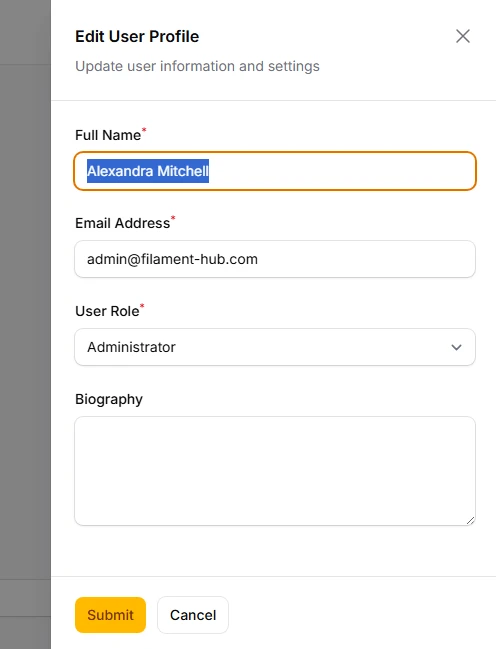
Provide contextual information and actions through slide-over panels that preserve the main page context while offering detailed functionality. Slide-overs are perfect for editing records, showing related data, or secondary workflows that don't require full page navigation.
use Filament\Actions\Action;
use Filament\Forms\Components\TextInput;
use Filament\Forms\Components\Textarea;
use Filament\Forms\Components\Select;

Action::make('editUser')
    ->label('Edit User')
    ->color('warning')
    ->icon('heroicon-o-pencil')
    ->slideOver()
    ->modalHeading('Edit User Profile')
    ->modalDescription('Update user information and settings')
    ->stickyModalHeader()
    ->stickyModalFooter()
    ->modalWidth('md')
    ->fillForm(fn () => [
        'name' => $this->record->name,
        'email' => $this->record->email,
        'role' => $this->record->role,
        'bio' => $this->record->bio,
    ])
    ->form([
        TextInput::make('name')
            ->label('Full Name')
            ->required()
            ->maxLength(255),
        TextInput::make('email')
            ->label('Email Address')
            ->email()
            ->required()
            ->unique(User::class, 'email', $this->record),
        Select::make('role')
            ->label('User Role')
            ->options([
                'admin' => 'Administrator',
                'editor' => 'Editor',
                'viewer' => 'Viewer',
            ])
            ->required(),
        Textarea::make('bio')
            ->label('Biography')
            ->rows(4)
            ->maxLength(1000),
    ])
    ->action(function (array $data) {
        $this->record->update($data);

        $this->refreshFormData(['name', 'email', 'role', 'bio']);

        Notification::make()
            ->title('User updated successfully')
            ->success()
            ->send();
    })