
User Menu
The user menu in Filament provides a powerful dropdown interface positioned in the top-right corner of your admin panel, offering authenticated users quick access to profile settings, account actions, and custom functionality. Unlike traditional navigation menus, user menus are contextual to the logged-in user and can be dynamically customized based on permissions, roles, or user-specific data. This dropdown serves as the primary hub for user-centric actions that don't belong in the main navigation, creating a clean separation between system navigation and personal account management.
# Basic profile and logout customization
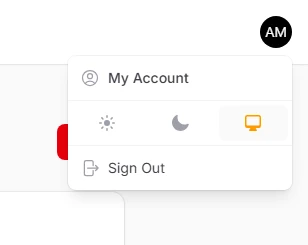
Override the default profile and logout links with custom labels, icons, and destinations. Filament provides dedicated array keys that let you seamlessly replace these core menu items while maintaining their expected positioning and behavior.
use Filament\Panel;

public function panel(Panel $panel): Panel
{
    return $panel
        ->userMenuItems([
            'profile' => fn (Action $action) => $action
                ->label('My Account')
                ->icon('heroicon-o-user-circle'),
            'logout' => fn (Action $action) => $action
                ->label('Sign Out')
                ->icon('heroicon-o-arrow-right-on-rectangle'),
        ]);
}
# Custom menu items with icons and URLs
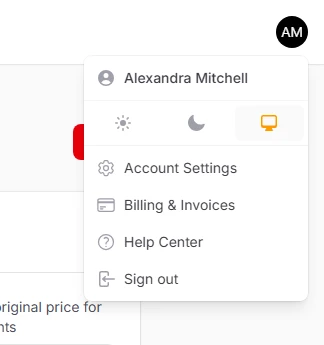
Add your own menu items with custom icons, labels, and destination URLs. Each menu item becomes a clickable action that can navigate to any page within your application or external websites, providing unlimited flexibility for user-specific functionality.
use App\Filament\Pages\UserSettings;
use Filament\Actions\Action;
use Filament\Panel;

public function panel(Panel $panel): Panel
{
    return $panel
        ->userMenuItems([
            Action::make('settings')
                ->label('Account Settings')
                ->url(fn (): string => UserSettings::getUrl())
                ->icon('heroicon-o-cog-6-tooth'),
            Action::make('billing')
                ->label('Billing & Invoices')
                ->url('/billing')
                ->icon('heroicon-o-credit-card'),
            Action::make('help')
                ->label('Help Center')
                ->url('https://help.company.com')
                ->icon('heroicon-o-question-mark-circle'),
        ]);
}