
Tab Layouts
Transform long, complex forms into intuitive, organized interfaces using powerful tab components that reduce cognitive load and improve user experience. Instead of overwhelming users with massive single-page forms, Filament's tab layouts break content into logical sections while maintaining contextual relationships between related fields. From basic organizational tabs to sophisticated vertical layouts, persistent state management, and dynamic badge indicators, these tools enable you to create clean, professional forms that guide users naturally through complex data entry workflows.
# Basic tab organization

Create clean, organized forms by grouping related fields into logical sections using tab components. Perfect for breaking down complex forms like user profiles, product management, or multi-step configurations into digestible chunks that improve both usability and completion rates.
use Filament\Schemas\Components\Tabs;
use Filament\Forms\Components\TextInput;
use Filament\Forms\Components\Textarea;

Tabs::make('Product Management')
    ->tabs([
        Tabs\Tab::make('Basic Info')
            ->schema([
                TextInput::make('name')
                    ->required(),
                TextInput::make('sku')
                    ->unique(),
                Textarea::make('description'),
            ]),
        Tabs\Tab::make('Pricing')
            ->schema([
                TextInput::make('price')
                    ->numeric()
                    ->prefix('$'),
                TextInput::make('cost')
                    ->numeric()
                    ->prefix('$'),
                TextInput::make('margin')
                    ->suffix('%'),
            ]),
        Tabs\Tab::make('Inventory')
            ->schema([
                TextInput::make('stock_quantity')
                    ->numeric(),
                TextInput::make('reorder_level')
                    ->numeric(),
                TextInput::make('supplier_id'),
            ]),
    ])
    ->activeTab(1) // Setting a default active tab
# Tab icons and positioning
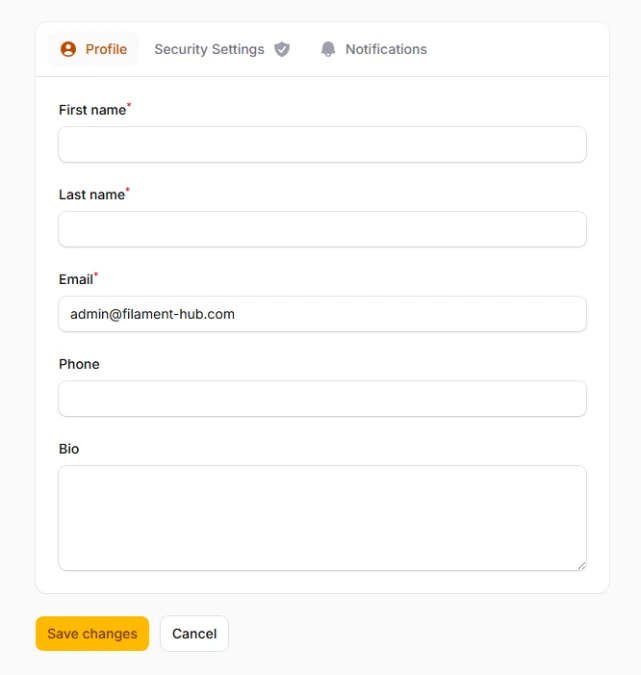
Enhance visual recognition and improve navigation speed using meaningful icons that help users quickly identify tab content. Icons can be positioned before or after text labels to match your interface design patterns and user expectations.
use Filament\Schemas\Components\Tabs;
use Filament\Support\Enums\IconPosition;

Tabs::make('Account Settings')
    ->tabs([
        Tabs\Tab::make('Profile')
            ->icon('heroicon-m-user')
            ->schema([
                // Profile fields
            ]),
        Tabs\Tab::make('Security')
            ->icon('heroicon-m-shield-check')
            ->iconPosition(IconPosition::After)
            ->schema([
                // Security settings
            ]),
        Tabs\Tab::make('Notifications')
            ->icon('heroicon-m-bell')
            ->schema([
                // Notification preferences
            ]),
    ])
# Tab badges and counts
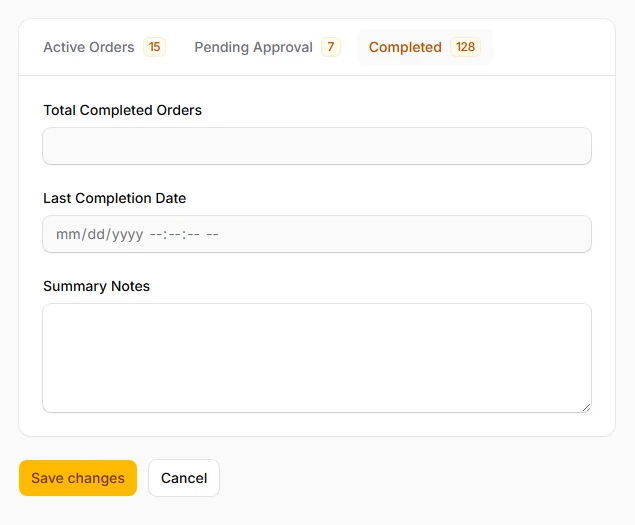
Display real-time status indicators and numerical counts to communicate important information at a glance. Perfect for showing validation errors, pending items, or completion status without requiring users to click through each tab.
use Filament\Schemas\Components\Tabs;

Tabs::make('Content Management')
    ->tabs([
        Tabs\Tab::make('Published')
            ->badge(12)
            ->schema([
                // Published content
            ]),
        Tabs\Tab::make('Drafts')
            ->badge(3)
            ->schema([
                // Draft content
            ]),
        Tabs\Tab::make('Pending Review')
            ->badge(5)
            ->schema([
                // Content awaiting review
            ]),
    ])
# Badge color customization
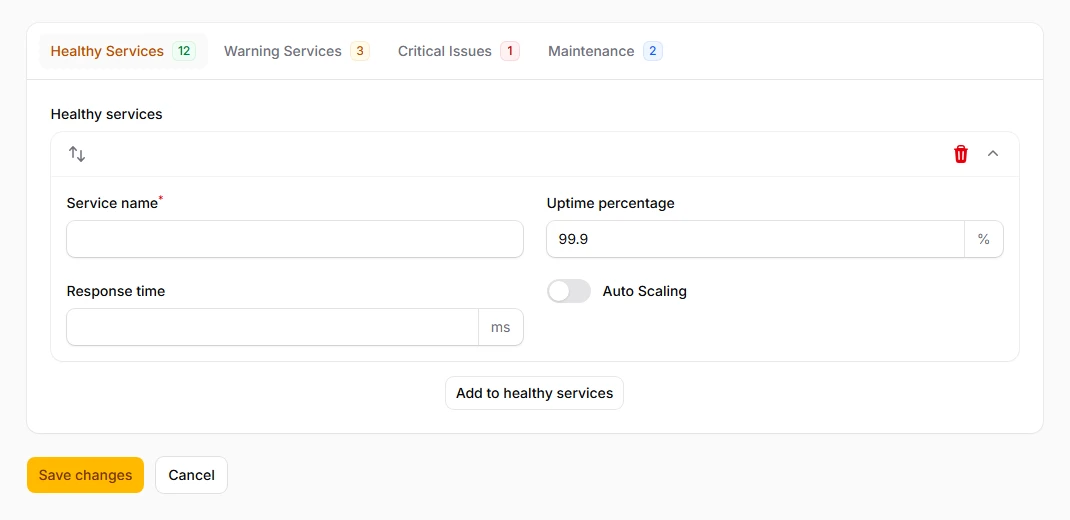
Use color-coded badges to convey different types of information and urgency levels. Essential for status-driven interfaces where users need to quickly identify priorities, errors, or completion states across multiple tabs.
use Filament\Schemas\Components\Tabs;

Tabs::make('System Status')
    ->tabs([
        Tabs\Tab::make('Active Services')
            ->badge(8)
            ->badgeColor('success')
            ->schema([
                // Running services
            ]),
        Tabs\Tab::make('Warnings')
            ->badge(2)
            ->badgeColor('warning')
            ->schema([
                // Services with warnings
            ]),
        Tabs\Tab::make('Critical Issues')
            ->badge(1)
            ->badgeColor('danger')
            ->schema([
                // Failed services
            ]),
    ])
# URL query persistence
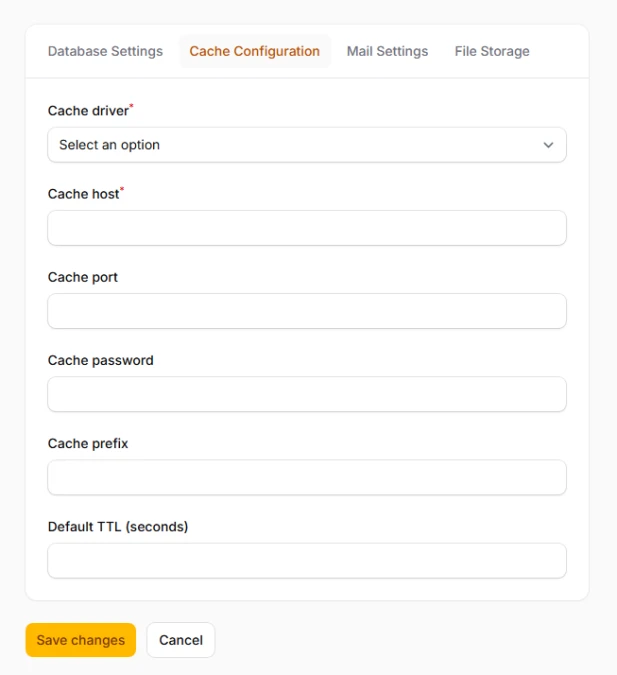
Enable bookmarkable tab states by persisting the active tab in the URL query string. Perfect for shareable forms or when users need to link directly to specific tabs for support, training, or collaborative workflows.
use Filament\Schemas\Components\Tabs;

Tabs::make('Application Settings')
    ->tabs([
        Tabs\Tab::make('Database')
            ->schema([
                // Database configuration
            ]),
        Tabs\Tab::make('Cache')
            ->schema([
                // Cache settings
            ]),
        Tabs\Tab::make('Mail')
            ->schema([
                // Email configuration
            ]),
    ])
    ->persistTabInQueryString('config-section')
    // Creates URLs like: /settings?config-section=cache
# Vertical tab layout
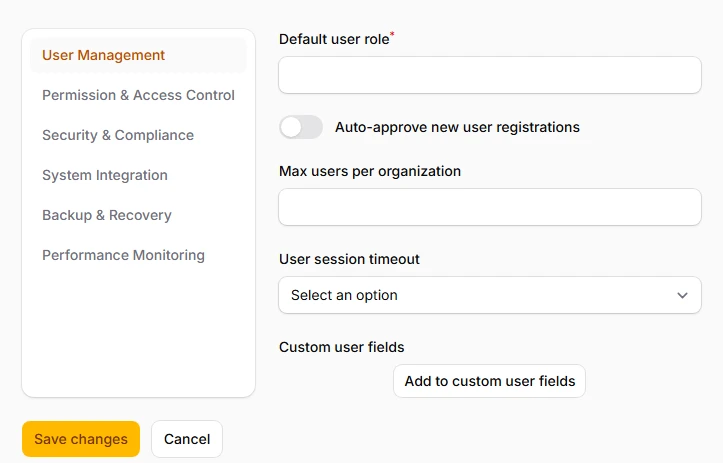
Switch to a vertical tab orientation for better use of wide screens and improved readability with longer tab labels. New in Filament v4, this layout works particularly well for navigation-heavy forms or when you have many tabs to display.
use Filament\Schemas\Components\Tabs;

Tabs::make('System Administration')
    ->tabs([
        Tabs\Tab::make('User Management')
            ->schema([
                // User administration
            ]),
        Tabs\Tab::make('Permission Settings')
            ->schema([
                // Permission configuration
            ]),
        Tabs\Tab::make('Audit Logs')
            ->schema([
                // System auditing
            ]),
        Tabs\Tab::make('Backup Configuration')
            ->schema([
                // Backup settings
            ]),
    ])
    ->vertical() // New v4 feature