
Widget Filters
Transform your dashboard into a dynamic data exploration tool with powerful filtering capabilities that work seamlessly across all your widgets. Whether you need simple date ranges, complex multi-field forms, or real-time filtering updates, Filament's widget filter system provides the flexibility to create sophisticated dashboard experiences that rival analytics platforms like Google Analytics.
# Dashboard Filter Forms
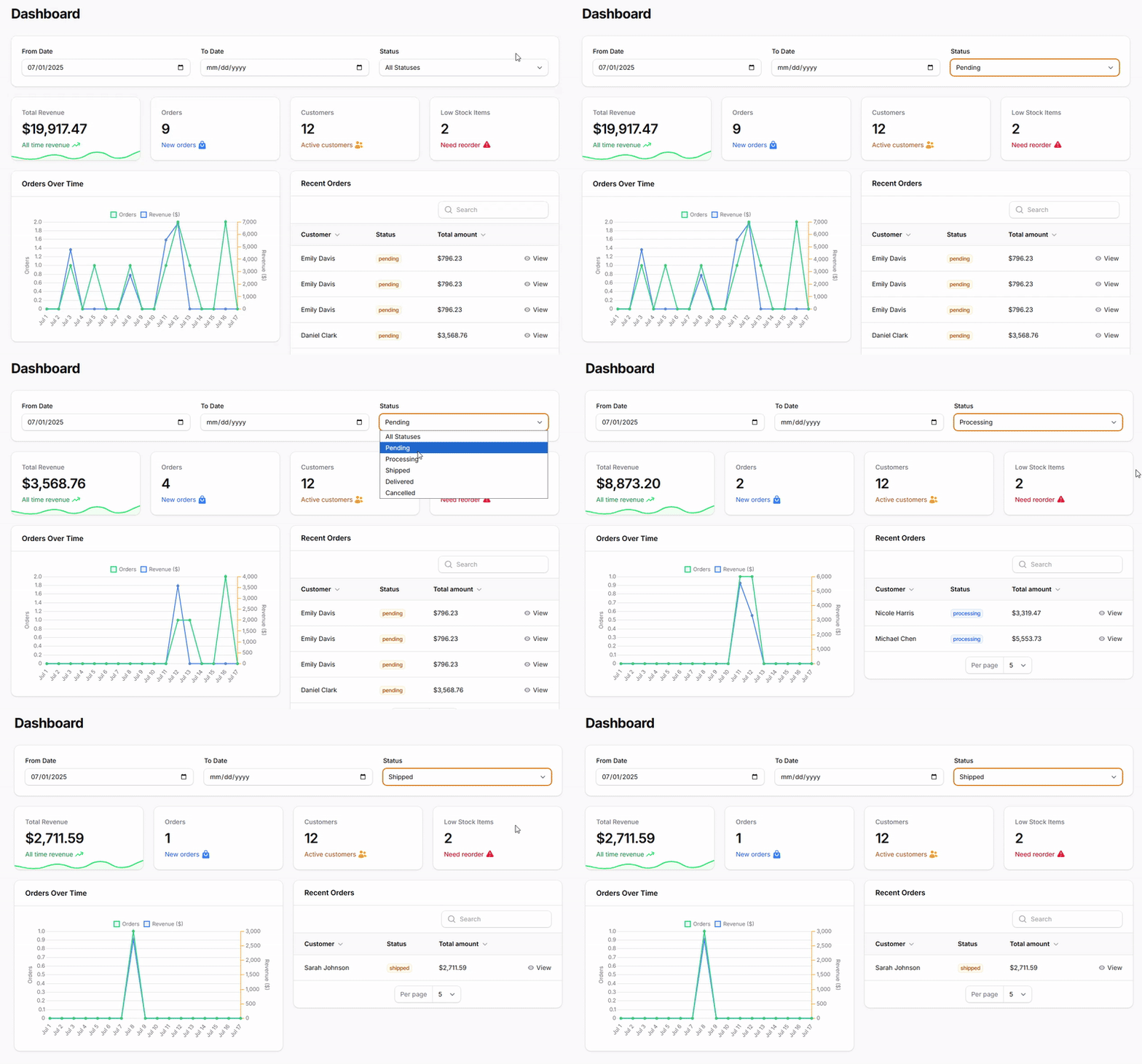
Create a comprehensive filtering interface in your dashboard header that automatically affects all widgets simultaneously. This approach provides a centralized control point where users can set global parameters that cascade down to every widget on the page, creating a cohesive and predictable filtering experience.
First you need to disable the build in Dashboard in your Panel Provider:
use Filament\Panel;

public function panel(Panel $panel): Panel
{
    return $panel
        // ...
        ->pages([]);
}
Then creating a new Filament Page as your dashboard with the Filters:
<?php
namespace App\Filament\Pages;

use Filament\Forms\Components\DatePicker;
use Filament\Forms\Components\Select;
use Filament\Pages\Dashboard as BaseDashboard;
use Filament\Pages\Dashboard\Concerns\HasFiltersForm;
use Filament\Schemas\Components\Section;
use Filament\Schemas\Schema;

class Dashboard extends BaseDashboard
{
    use HasFiltersForm;

    public function filtersForm(Schema $schema): Schema
    {
        return $schema
            ->schema([
                Section::make()
                    //->description('Apply filters to all dashboard widgets')
                    ->schema([
                        DatePicker::make('startDate')
                            ->label('From Date')
                            ->maxDate(now()),
                        DatePicker::make('endDate')
                            ->label('To Date')
                            ->maxDate(now()),
                        Select::make('status')
                            ->options([
                                'pending' => 'Pending',
                                'processing' => 'Processing',
                                'shipped' => 'Shipped',
                                'delivered' => 'Delivered',
                                'cancelled' => 'Cancelled',
                            ])
                            ->placeholder('All Statuses'),
                    ])
                    ->columns(3)
                    ->columnSpanFull(),
            ]);
    }
}
And finally update the query for each Widget:
<?php

namespace App\Filament\Widgets;

use Filament\Widgets\ChartWidget;
use Filament\Widgets\Concerns\InteractsWithPageFilters;
use Carbon\Carbon;

class OrdersChartWidget extends ChartWidget
{
    use InteractsWithPageFilters;

    protected ?string $heading = 'Orders Over Time';
    protected static ?int $sort = 2;

    protected function getData(): array
    {
        $startDate = $this->filters['startDate'] ?? now()->subMonth();
        $endDate = $this->filters['endDate'] ?? now();
        $status = $this->filters['status'] ?? null;
# Individual Widget Filters
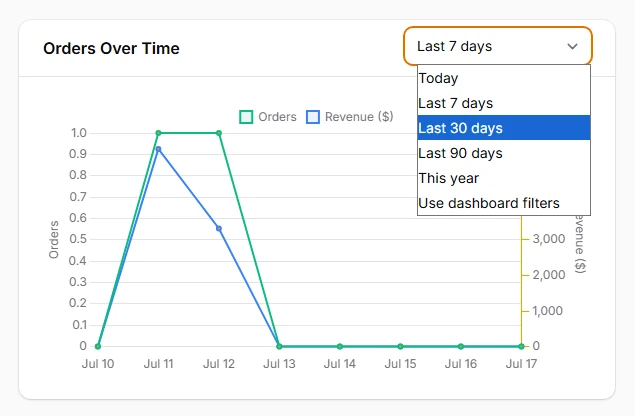
Add widget-specific filters that only affect individual widgets, perfect for cases where different widgets need different filtering capabilities or when you want to provide granular control over specific data views without affecting the entire dashboard.
<?php

namespace App\Filament\Widgets;

use App\Models\Order;
use Filament\Widgets\ChartWidget;
use Filament\Widgets\Concerns\InteractsWithPageFilters;
use Carbon\Carbon;

class OrdersChartWidget extends ChartWidget
{
    use InteractsWithPageFilters;

    protected ?string $heading = 'Orders Over Time';
    protected static ?int $sort = 2;

    public ?string $filter = 'month';

    protected function getFilters(): ?array
    {
        return [
            'today' => 'Today',
            'week' => 'Last 7 days',
            'month' => 'Last 30 days',
            'quarter' => 'Last 90 days',
            'year' => 'This year',
            'custom' => 'Use dashboard filters',
        ];
    }

    protected function getData(): array
    {
        if ($this->filter === 'custom') {
            $startDate = $this->filters['startDate'] ?? now()->subMonth();
            $endDate = $this->filters['endDate'] ?? now();
        } else {
            [$startDate, $endDate] = $this->getDateRange();
        }

        $status = $this->filters['status'] ?? null;