
Advanced Filters
Move beyond simple dropdown selections to create sophisticated filtering experiences that handle complex business logic, multi-step filtering workflows, and dynamic query building. Filament's advanced filtering system empowers users to build complex queries interactively, handle relationship-based filtering, and create dependent filter chains that adapt based on previous selections, all while maintaining an intuitive user experience.
# Date Range Pickers with Preset Options
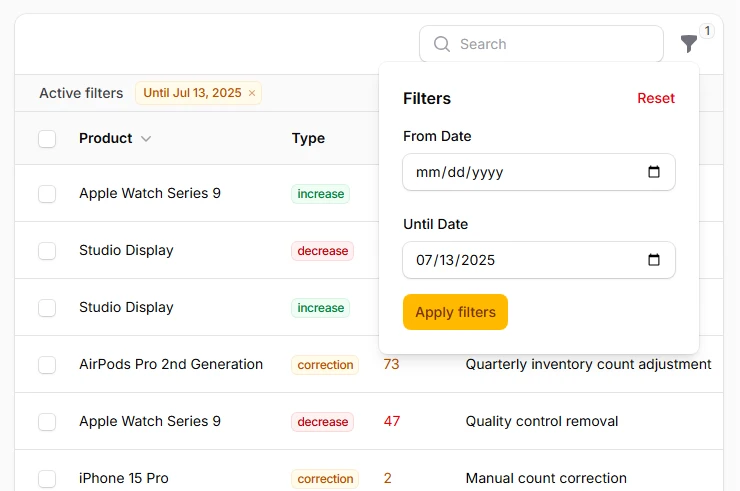
Transform simple date filtering into powerful time-based analytics with intelligent date range selection. Users can choose from common presets like "Last 30 days" or "This Quarter" while also having the flexibility to select custom ranges. The picker automatically handles timezone conversions and provides clear visual indicators of the selected range.
->filters([
    Filter::make('adjustment_date')
        ->schema([
            DatePicker::make('date_from')
                ->label('From Date')
                ->placeholder('Select start date'),
            DatePicker::make('date_until')
                ->label('Until Date')
                ->placeholder('Select end date')
                ->default(now()),
        ])
        ->query(function () {
            // ...
        }),
])
# Relationship-based Filtering with Search
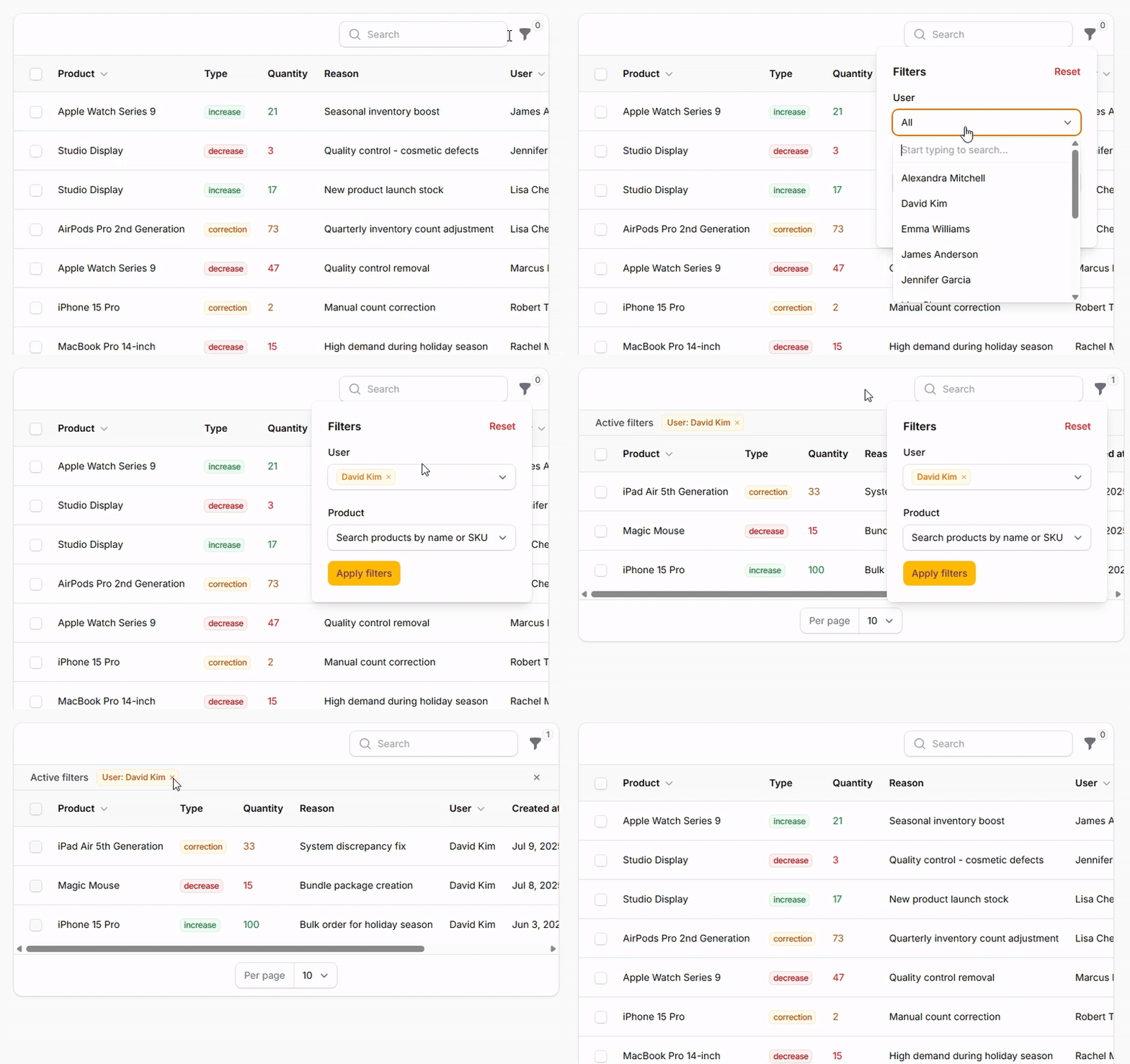
Filter records based on complex relationship data with intelligent search capabilities. Users can search across multiple relationship attributes, and the filter automatically handles nested relationship queries while providing responsive autocomplete suggestions for large datasets.
->filters([
    SelectFilter::make('user')
        ->relationship('user', 'name')
        ->searchable(['name', 'email'])
        ->preload()
        ->multiple()
        ->getSearchResultsUsing(function () {
            // ...
        }),

    SelectFilter::make('product')
        ->relationship('product', 'name')
        ->searchable(['name', 'sku'])
        ->preload()
        ->multiple()
        ->placeholder('Search products by name or SKU'),
]);
# Custom Filter Forms with Complex Logic
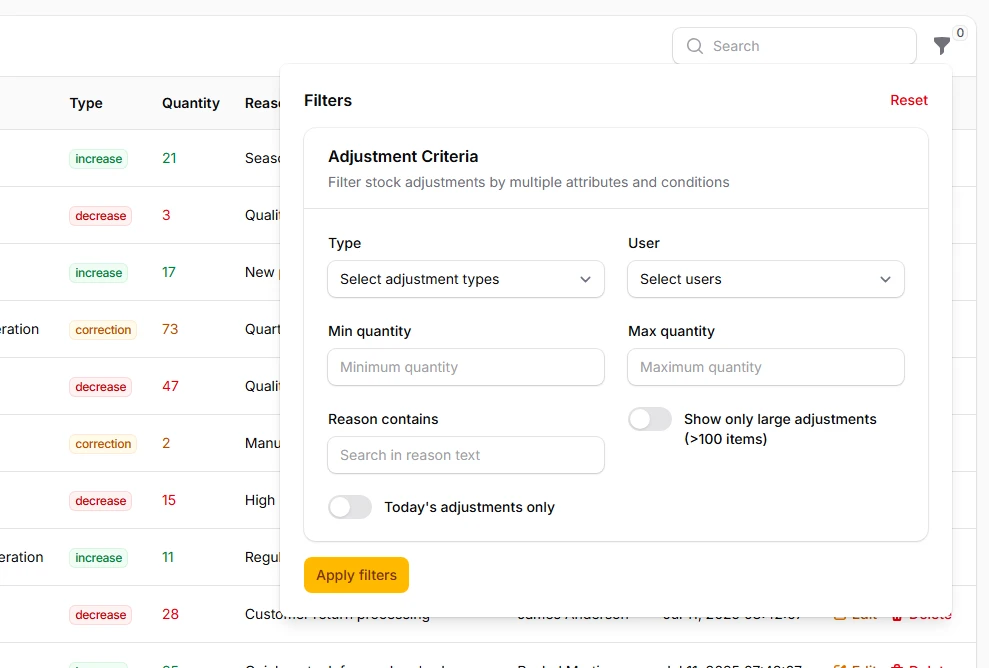
Build sophisticated filter interfaces using the full power of Filament's form builder. Combine multiple field types, implement conditional logic, and create multi-step filtering workflows that guide users through complex data exploration scenarios with contextual help and validation.
->filters([
    Filter::make('advanced_adjustment_filter')
        ->schema([
            ComponentsSection::make('Adjustment Criteria')
                ->description('Filter stock adjustments by multiple attributes and conditions')
                ->schema([
                    Select::make('type')
                        ->options([
                            'increase' => 'Stock Increase',
                            'decrease' => 'Stock Decrease',
                            'correction' => 'Stock Correction',
                        ])
                        ->multiple()
                        ->placeholder('Select adjustment types'),

                    Select::make('user_id')
                        ->relationship('user', 'name')
                        ->searchable()
                        ->preload()
                        ->placeholder('Select users'),

                    TextInput::make('min_quantity')
                        ->numeric()
                        ->placeholder('Minimum quantity'),

                    TextInput::make('max_quantity')
                        ->numeric()
                        ->placeholder('Maximum quantity'),

                    TextInput::make('reason_contains')
                        ->placeholder('Search in reason text'),

                    Toggle::make('large_adjustments_only')
                        ->label('Show only large adjustments (>100 items)')
                        ->default(false),

                    Toggle::make('today_only')
                        ->label('Today\'s adjustments only'),
                ])
                ->columns(2),
        ])
        ->query(function () {
            // ...
        }),
])
->filtersFormWidth('2xl')
# Query Builder for Complex Constraints
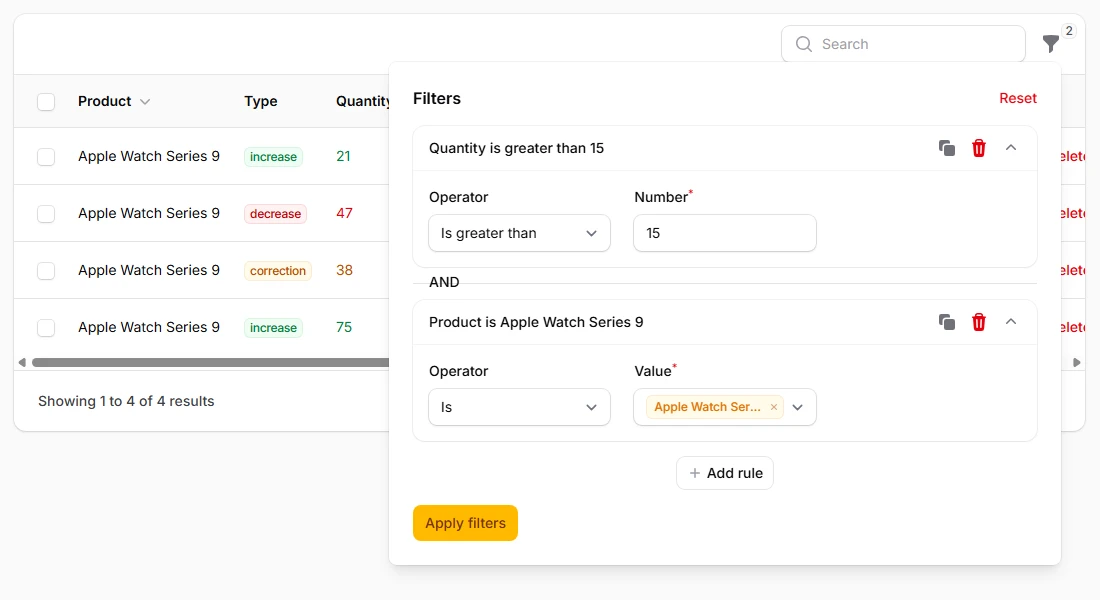
Empower users to build sophisticated queries visually without SQL knowledge. The query builder supports unlimited nesting, multiple constraint types, and logical grouping with AND/OR operations. Users can save frequently used query combinations and share them with team members.
->filters([
    QueryBuilder::make()
        ->constraints([
            TextConstraint::make('reason')
                ->label('Reason')
                ->icon('heroicon-m-chat-bubble-left-ellipsis'),

            NumberConstraint::make('quantity')
                ->label('Quantity')
                ->icon('heroicon-m-calculator'),

            SelectConstraint::make('type')
                ->label('Adjustment Type')
                ->icon('heroicon-m-adjustments-horizontal')
                ->options([
                    'increase' => 'Stock Increase',
                    'decrease' => 'Stock Decrease',
                    'correction' => 'Stock Correction',
                ])
                ->multiple(),

            DateConstraint::make('created_at')
                ->label('Created Date')
                ->icon('heroicon-m-calendar'),

            RelationshipConstraint::make('user')
                ->label('User')
                ->icon('heroicon-m-user')
                ->selectable(
                    IsRelatedToOperator::make()
                        ->titleAttribute('name')
                        ->searchable()
                        ->multiple()
                        ->preload(),
                ),

            RelationshipConstraint::make('product')
                ->label('Product')
                ->icon('heroicon-m-cube')
                ->selectable(
                    IsRelatedToOperator::make()
                        ->titleAttribute('name')
                        ->searchable()
                        ->multiple()
                        ->preload(),
                ),
        ]),
])
->filtersFormWidth('2xl')