
Quick Guide
Filament is a powerful, developer-friendly admin panel for Laravel that lets you build modern interfaces with minimal effort. This quick start guide walks you through everything you need to know to get up and running — from installation to your first resource — all in just a few simple steps. Whether you're building an e-commerce dashboard, a CMS, or internal tools, this is the perfect place to begin your Filament journey.
# Getting Started with Laravel Filament
Filament is a modern, elegant admin panel builder for Laravel. It lets you build fully functional dashboards, resource management tools, and custom interfaces at lightning speed. With Filament 4, things are faster, more powerful, and more streamlined than ever.
This guide walks you through the fastest way to get started using Filament 4, showing how quickly you can build real, working features.
# Step 1: Install Laravel
Start by creating a new Laravel project:
composer create-project laravel/laravel name-of-your-project
Set up your .env file to connect to a database:
DB_CONNECTION=mysql
DB_DATABASE=filament_demo
DB_USERNAME=root
DB_PASSWORD=
And make sure you setup the Laravel App:
php artisan migrate
php artisan storage:link
npm install (for front-end)
# Step 2: Install Filament
Install the latest Filament:
composer require filament/filament
php artisan filament:install
Create your first admin user to log in to the panel:
php artisan make:filament-user
You’ll be prompted to enter name, email, and password. Once done, head to your Filament panel:
http://your-app.test/admin
Log in using the user you just created.
# Step 3: Create Your First Resource

Let’s say you want to manage "Products".
First, create the model and migration:
php artisan make:model Product -m
Then edit the migration file:
Schema::create('products', function (Blueprint $table) {
    $table->id();
    $table->string('name');
    $table->decimal('price', 8, 2);
    $table->timestamps();
});
Run the migration:
php artisan migrate
Make sure the properties are fillable
// app/Models/Product.php

class Product extends Model
{
    public $fillable = [
        'name',
        'price',
        'updated_at',
        'created_at'
    ];
}
Now generate the Filament resource:
php artisan make:filament-resource Product
This will scaffold:
- A form for creating/editing products
- A table to list them
- Navigation in the admin panel
Go to your admin panel and you’ll see Products in the sidebar. You can now create, edit, and manage them visually.
# Step 4: Customize the Resource
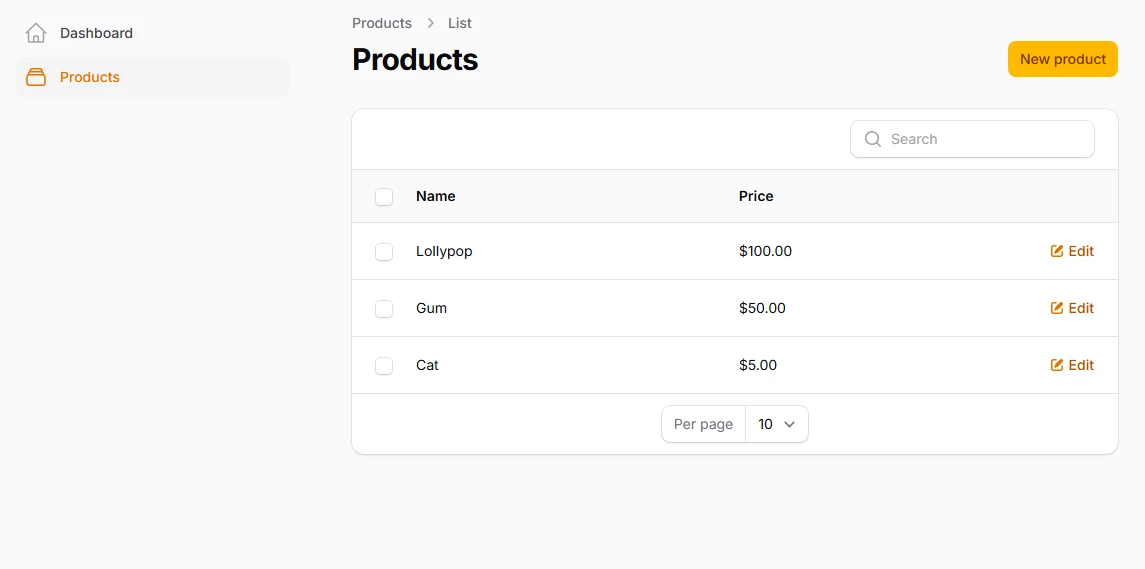
Open the generated resource file - inside configure() method:
// app/Filament/Resources/Product/Schemas/ProductForm.php

use Filament\Forms\Components\TextInput;

public static function configure(Schema $schema): Schema
{
    return $schema
        ->components([
            TextInput::make('name')
                ->required()
                ->maxLength(255),

            TextInput::make('price')
                ->prefix('$')
                ->numeric(),
        ]);
}
And let's adjust the list view - inside the configure() method:
// app/Filament/Resources/Product/Tables/ProductTable.php

use Filament\Tables\Columns\TextColumn;

public static function configure(Table $table): Table
{
    return $table
        ->columns([
            TextColumn::make('name')
                ->searchable(),

            TextColumn::make('price')
                ->money('usd'),
        ])
        ->filters([
            //
        ])
        ->recordActions([
            EditAction::make(),
        ])
        ->toolbarActions([
            BulkActionGroup::make([
                DeleteBulkAction::make(),
            ]),
        ]);
}
You can customize fields, validations, layout, filters, actions, and more.
# More Things You Can Build
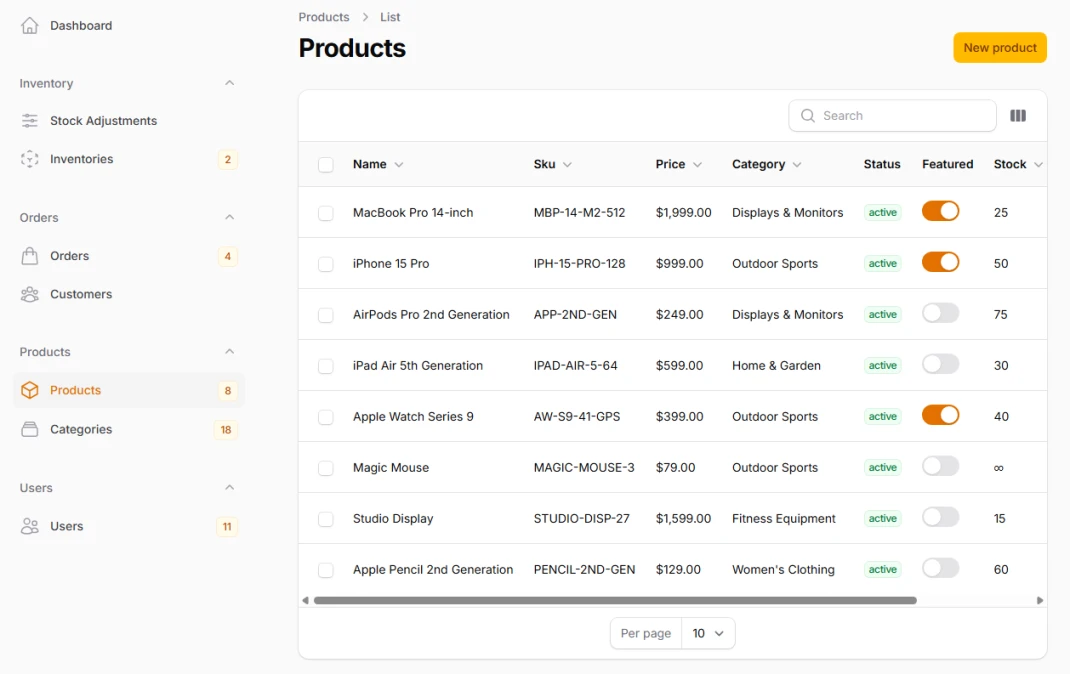
Filament is designed to scale with your needs. With just a few commands and some configuration, you can build powerful features:
- Dashboards with custom widgets
- Pages with custom logic and design
- Relation managers to manage related records
- Form builders for dynamic, interactive forms
- Table views with filtering, sorting, bulk actions
- Authentication via Laravel’s native system
- Authorization using policies and gates
Filament also supports themes, global search, custom actions, and a clean developer experience using modern PHP and Tailwind CSS.
# Example Use Cases
E-commerce Admin
Manage products, categories, orders, customers, and inventory.
CRM System
Track leads, manage contacts, assign tasks, and follow up sales.
Content Management System (CMS)
Create pages, blog posts, upload media, manage users, and moderate content.
Internal Admin Tools
Dashboards for HR, finance, logistics, and more.
# You're Ready
With Filament, you can go from blank Laravel project to fully working admin panel in minutes.
It’s simple to get started, but powerful enough to scale with your project. Start building, customizing, and shipping faster than ever.