
Repeatable Entry
The RepeatableEntry component transforms how you display collections of related data in Filament Info Lists, turning complex arrays and relationships into organized, readable presentations. Instead of cramming multiple related items into single columns or creating separate sections, this powerful component automatically iterates through your data collections and applies a consistent schema to each item. Whether you're displaying user comments, order line items, team member details, or any other grouped information, RepeatableEntry ensures perfect visual consistency while maintaining the flexibility to organize data exactly how your users need to see it.
# Basic repeatable schema
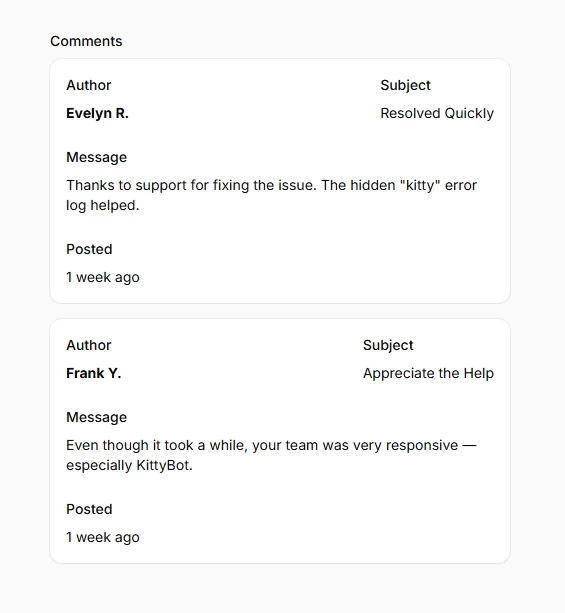
Create consistent layouts for each item in a collection using a shared schema definition. Every item in your array or relationship gets rendered with the same entry structure, ensuring uniform presentation across all data. Perfect for displaying lists where each item needs the same information hierarchy and visual treatment.
use Filament\Infolists\Components\RepeatableEntry;
use Filament\Infolists\Components\TextEntry;

RepeatableEntry::make('comments')
    ->schema([
        TextEntry::make('author.name')
            ->label('Author')
            ->weight('bold'),
        TextEntry::make('title')
            ->label('Subject'),
        TextEntry::make('content')
            ->label('Message')
            ->columnSpan(2),
        TextEntry::make('created_at')
            ->label('Posted')
            ->dateTime()
            ->since(),
    ])
    ->columns(2)
# Responsive grid layouts
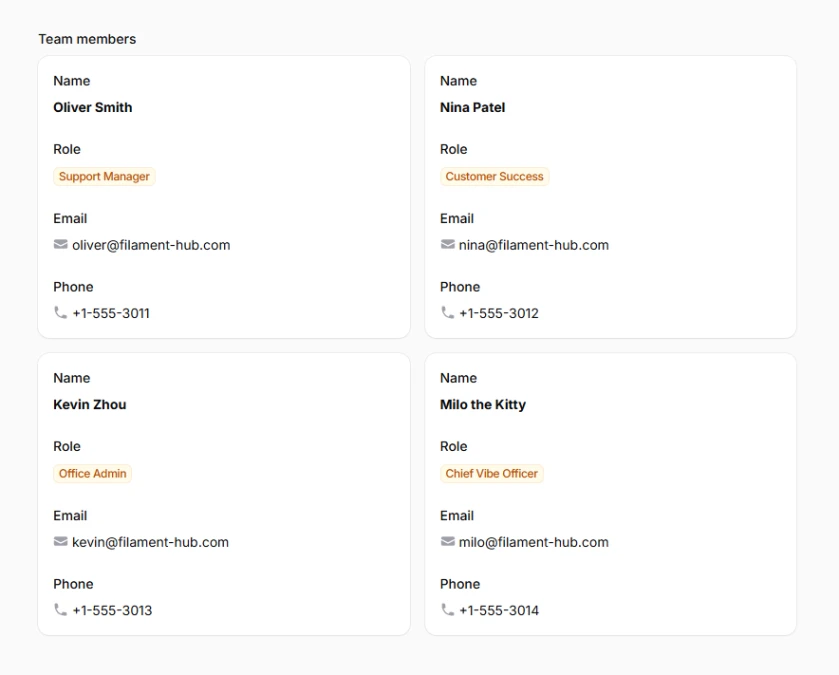
Control how repeatable items organize themselves across different screen sizes using responsive column configurations. The grid system adapts automatically to ensure optimal readability on all devices, from mobile phones to ultra-wide monitors. Uses Tailwind's standard breakpoints for predictable, consistent behavior.
RepeatableEntry::make('team_members')
    ->schema([
        TextEntry::make('name')
            ->weight('bold'),
        TextEntry::make('role')
            ->badge()
            ->color('primary'),
        TextEntry::make('email')
            ->icon('heroicon-m-envelope'),
        TextEntry::make('phone')
            ->icon('heroicon-m-phone'),
    ])
    ->grid([
        'default' => 1,
        'sm' => 2,
        'lg' => 3,
        'xl' => 4,
    ])